Troubleshooting on Linux
Your save folder is ~/.local/share/FasterThanLight/.
Failed to install hook
Section titled “Failed to install hook”Fatal ErrorFailed to install hook for WeaponControl::RenderAiming:Failed to make copy of original code executableSELinux is blocking the Hyperspace library from being linked. Fedora ships with it enabled, so that is where this usually turns up. The fix is to add an exception.
-
Check whether SELinux is running:
Terminal window sestatus -
If it is enabled, check whether it is enforcing:
Terminal window getenforceAnything other than
Enforcingmeans SELinux is not your problem. -
Build and install the exception.
ausearchfinds the denial,audit2allowturns it into a rule, andsemoduleloads it:Terminal window sudo ausearch -c "FTL.amd64" --raw | audit2allow -M FTLMultiverse && sudo semodule -i FTLMultiverse.ppSwap
FTL.amd64for the executable your architecture runs. Ifausearchfinds nothing, launch FTL once more to produce a fresh denial and try again. -
Confirm the rule loaded:
Terminal window sudo semanage module -l | grep FTLMultiverseYou should see something like
FTLMultiverse 400 pp.
Launch the game again and it should start normally.
Anything wrong with saves, on Steam
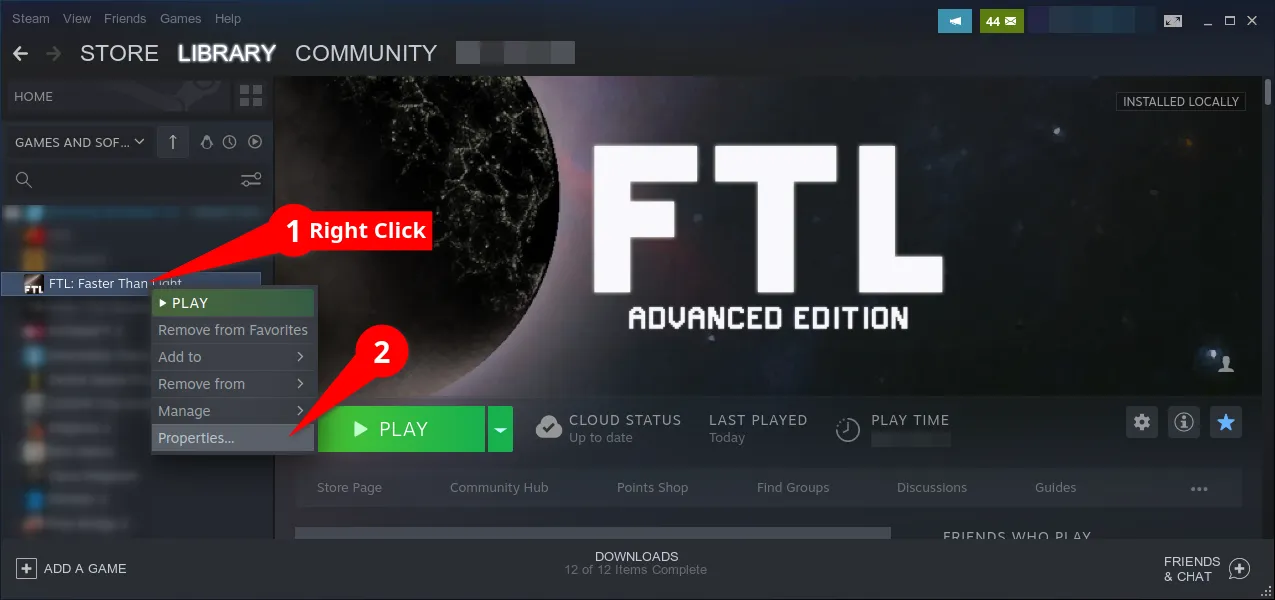
Section titled “Anything wrong with saves, on Steam”Right-click FTL: Faster Than Light in your library and open Properties.
Show me how to open Properties
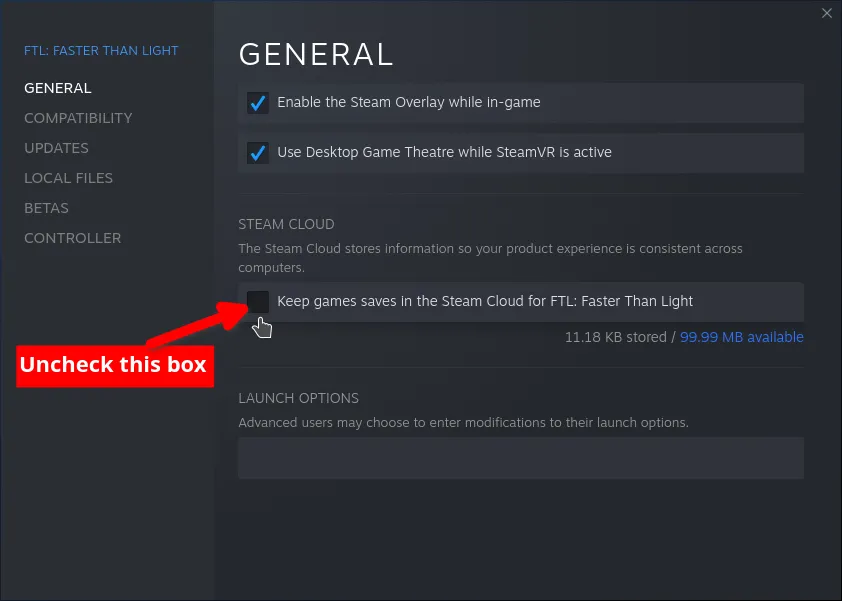
Under General, untick Keep game saves in the Steam Cloud. Turn off Steam Cloud first. It restores outdated saves with broken state, which can keep Hyperspace from launching and will undo any save fix you try later.
Show me the checkbox
Then under Updates, set automatic updates to Only update this game when I launch it.
Rename FasterThanLight to FasterThanLight-backup, then launch FTL. The game makes
a fresh folder, and your original saves stay in the backup if you ever want them back.
Do this once, right after turning Steam Cloud off. Cloud sync leaves behind a save that Hyperspace cannot read, which freezes the game at the end of the loading bar.
My game crashes before loading Multiverse
Section titled “My game crashes before loading Multiverse”Make sure you are on the latest Hyperspace. The Multiverse installer is frequently behind, and this is by far the most common cause.
If you are on a laptop with both integrated and dedicated graphics, try forcing FTL onto one or the other. Otherwise your save file is probably corrupt, see below.
My game hangs on the last E in Multiverse
Section titled “My game hangs on the last E in Multiverse”Your save file is corrupt.
My game hangs while loading but I can hear music
Section titled “My game hangs while loading but I can hear music”Your save file is corrupt.
Resolving a corrupt save file
Section titled “Resolving a corrupt save file”-
Find your save folder and locate
hs_mv_prof.savandhs_mv_version.sav. -
Delete
hs_mv_version.sav. -
Move
hs_mv_prof.savsomewhere else. Do not delete it. -
Launch the game, let it reach the main menu, then quit.
-
Move your original
hs_mv_prof.savback, replacing the one the game just made.
Still stuck? Ask in the Hyperspace channels on the Multiverse Discord.